Advanced
Control Engineering
Techniques & Technologies
Techniques & Technologies
FREE

DiabGo Version 2.5
The ultimate assistant for any diabetic
Food database
DiabGo ships with a pre-built food database based on the USDA Nutrient Database for Standard Reference, Release 18, containing more than 7000 items including many fastfood products.Each item provides detailled information about carbohydrates, proteins and fat. As for specifying the amount of a food item the default unit is g but you are free to define any additional unit you want , e.g. piece, item, cup, etc.
There are two possibilities to extend this database:
- You can manually add food items
(e.g. a certain pizza you bought at your local supermarket) using an
ergonomic dialog.
- You can import files containing many food items. See examples of xml-files that can be imported in the download section.
Activity database
DiabGo ships with a pre-built activity database containing about 170 items. These items are organised in categories like cycling, walking, home activities, etc.Each item provides information about the calories burned when being executed given duration and your current body weight.
There are two possibilities to extend this database:
- You can manually add activity items
(e.g. you found information about your favourite activity on the web)
using an ergonomic dialog.
- You can import files containing many activites. See an example of an xml-file that can be imported in the download section.
Calorie calculator
DiabGo features a calorie calculator that automatically tells you how many calories you have left to eat during the current day in order to reach your target weight.Based on age, gender, current and target body weight and base activity level your caloric need per day is determined. From this value the calories you already have eaten that day are subtracted and those having been burned executing extra activities are added.
The result is presented on the main screen making it easy for you to get your caloric balance each time you consult DiabGo.
Using DiabGo you can easily reach your target weight in a healthy manner.
Bolus insulin calculator
DiabGo estimates decent bolus insulin doses. By calculating the 500 Rule and the 2000 Rule as proposed and explained for example here, it tells you more or less how much insulin to inject in order to compensate your planned meal and to correct high BG readings.As each individual is unique, these rules have to be adapted to meet your needs. This can be done by adjusting the total daily dose of insulin you inject.
Diary
DiabGo keeps your diabetes diary. It provides easy-to-use dialogs to enter the following data and store it on your device:- BG reading - Enter current blood glucose reading from your meter either in mg/dl or in mmol/l
- Meals - Enter meals with detailed composition by choosing food items from database.
- Insulin - Enter all your insulin injections with time and amount. As for the types of insulin there are no limitations.
- HbA1c: Enter current HbA1c value.
- Activities: Enter all extra activities by choosing items from database and adding duration manually.
- Body weight: Enter current body weight on a daily basis either in kg or in lbs.
- Activity level: As your basic activity level may vary from day to day you can insert it into the diary as well.
- Comments: Enter free
text to comment extraordinary situations.
- Glucose and meals: Get an overview over what you ate (amount and composition) and your average BG values.
- Weight and activities: See how your weight changed with respect to your target weight.
Report generation - example
Using the csv-file exported from DiabGo there are many ways to create graphical reports utilising third-party software tools. Here is an example of a report generated merely with free open-source software (in this case "ploticus").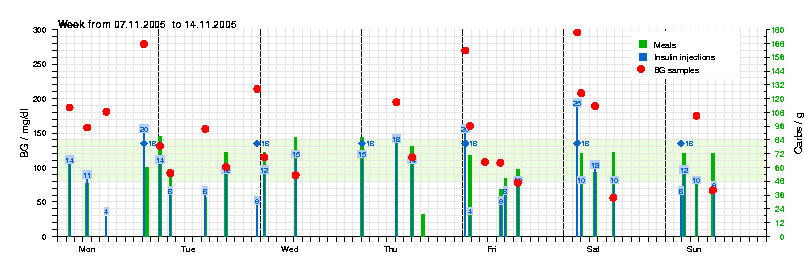
To reproduce this report with your data, please follow these steps:
- Download and install "ploticus" (it's free)
- Export your diary data to a file (in DiabGo tap: Diary->Export)
- Copy this file to your desktop computer (e.g. via ActiveSync)
- Extract each of the sections "samples", "meals" and "injections" to separate files using your favourite text editor
- Download the example ploticus script file here and save it in the same folder as the data files
- Edit this script file (choose start date and specify file names to import data from along with insulin names; see comments in file...)
- Run ploticus from the command line like this:
pl -cm -eps report.plo
where report.plo is the name of the script file.